This article shares the steps to edit the candidate's ATS profile URL in Karat's platform. This facilitates the synchronization between Karat and your ATS system. This content is intended for recruiters.
Important: The connection between the ATS and Karat systems via profile URLs is currently available only for Greenhouse and Lever ATS platforms.
Consider that adding or editing the candidate's profile URL from your ATS on the Karat system may result in missing updates for any notifications or outcomes that occurred before you added it.
If you want to add or edit the candidate's profile URL from your ATS follow these steps:
- Go to Karat’s platform.
- Click Assessments, in the left menu.
- Click Interviews, in the left menu.
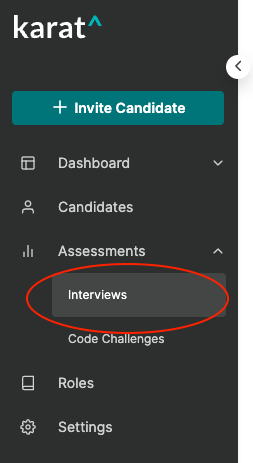
- Click the name of the candidate that you would like to add the URL.
- Copy the URL from the candidate's profile URL in your ATS.
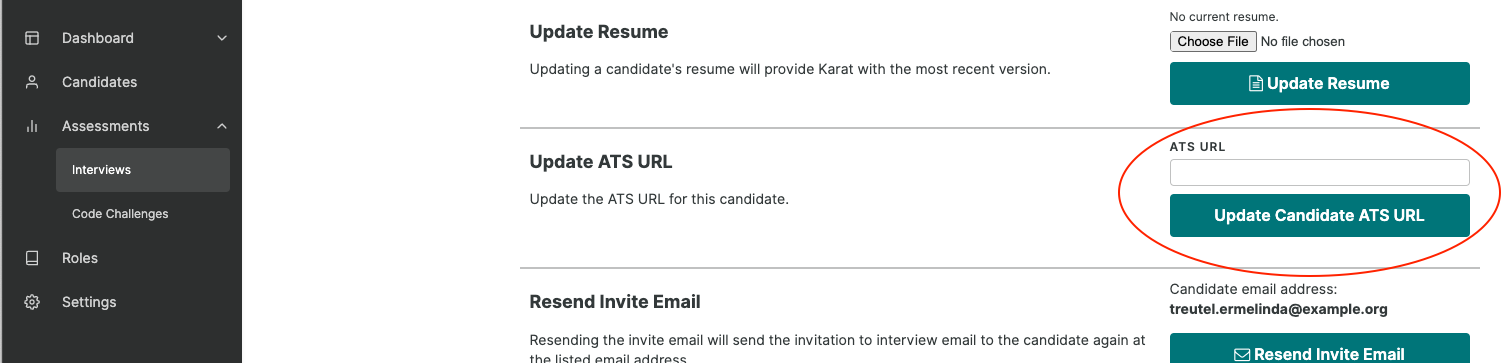
- Paste the URL into the ATS URL field , under the Update ATS URL section.
- Click Update Candidate ATS URL.
- This candidate is now associated to the ATS application linked. Updates to the ATS application will update this candidate status in Karat. Karat will post assessment updates to the linked ATS application.
Caution: If after updating the candidate's profile URL from your ATS you don't get notifications from Karat in your ATS, contact the Karat support team at support@karat.com.
Next steps
Explore some other helpful resources for ATS integration: