This guide outlines the actions you can perform on the Active Funnel Page as a user of your organization. This content is intended for all users on the Karat platform.
Prerequisites
Before beginning the setup process, you need to have the following:
- Have an account in the Karat Platform. You need to be invited by your organization's admin to create the account.
If you haven't received any invitation, contact your administrator.
Access to Active Funnel Page
After logging in to the Karat platform, you will be directed to the Active Funnel page.
The Active Funnel Page displays candidates from your organization, who are at various stages of the hiring process for each respective role. Each row in the active funnel represents a candidacy.
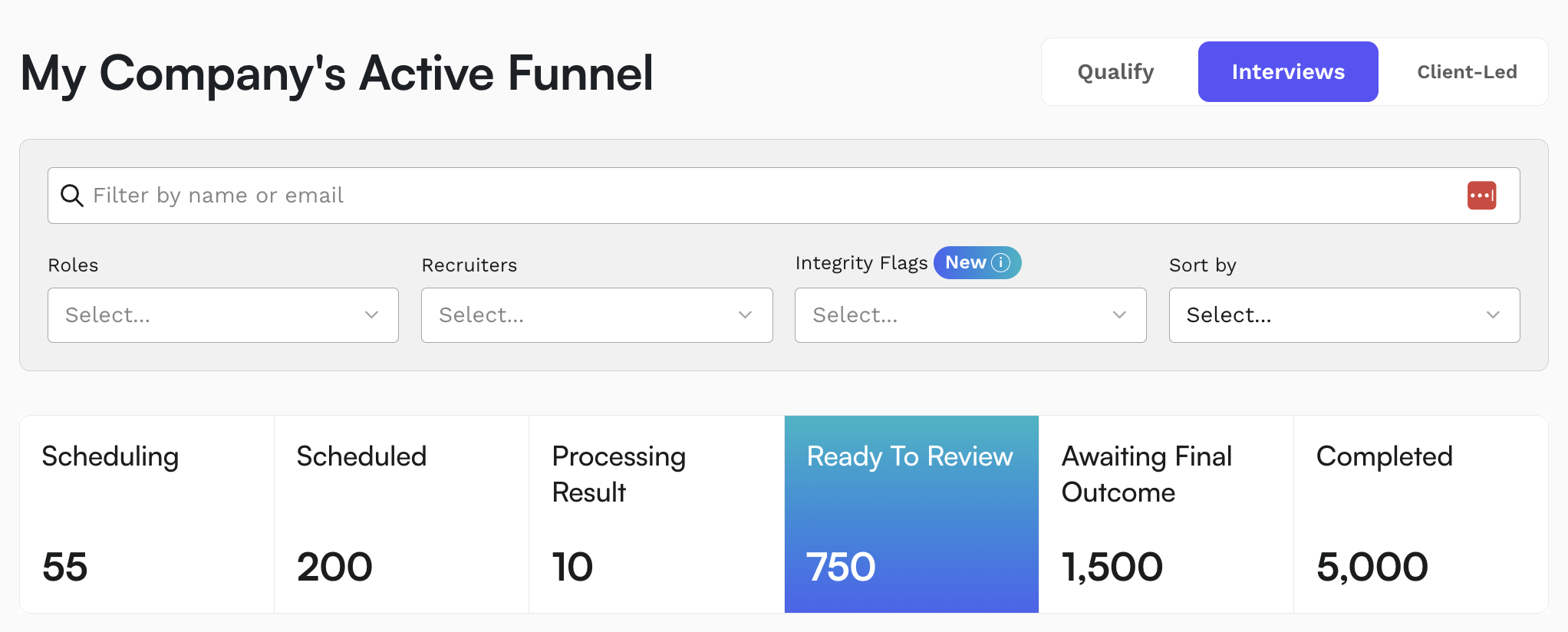
Candidacies are categorized based on their interview status:
- Scheduling: Candidates who still need to schedule their interview.
- Scheduled: Candidates who have scheduled an interview but have not yet taken it.
- Processing Result: Candidates who have completed their interview, and the results are being processed, or within redo-eligible-period of 24 hours, to allow candidates the opportunity to request a redo.
- Ready to Review: Candidates whose original and redo interviews have been processed and are ready for review.
- Awaiting Final Outcome: Candidates waiting for their post-Karat outcome status to be updated.
- Process Completed: Candidates whose process has concluded, either by being hired, rejected, or marked inactive. Inactive candidates are those who have withdrawn from the hiring process at any point of the funnel, and as such, inactive candidates may or may not have completed a Karat interview.
Features
- Search and Filter: The page is fully searchable. You can filter candidates by name, email, role, recruiter, or interview state.
- Sorting: Candidates can be sorted by the oldest or newest registration date.
-
Candidacy Information: The Active Funnel Page provides key details for each candidate, including:
- Name
- Role
- Role stage
- Karat interview recommendation (if the interview has been processed)
- Recruiter
- Last interview update (if applicable)
- Update status
- Updating Candidacy Status: In the Update Status column, you can click the Take Action button to manually update a candidate's status.
Keeping the Funnel Updated
It's crucial to keep your candidates' statuses up-to-date, especially if:
- You do not have an ATS integration set up.
- You are using a shared spreadsheet for candidate tracking.
By regularly updating statuses, you can:
- Maintain a clean and organized Active Funnel.
- Ensure that Karat's analytics and reporting remain accurate.
This will keep the Active Funnel and Karat's analytics accurate for reporting.
Export Data
An export function is available both from the "Export Link" on Active Funnel, as well as through Settings > Integrations > Disposition.